RoWeave splits a sheet into separate workbooks, one per branch, department or rep. Each keeps the same header, column widths and number formats. It also does the reverse: combines a folder of reports into one table.
Filter, copy, new file, paste, fix the column widths. Then repeat for every department. Or a macro only its author understands.
Finance & accounting
Send each cost center its own report
One company-wide report → a file for each cost center, with the same header and number formats.
HR
Give each manager only their own team
Employee list → a file per department, each with its own password. RoWeave saves the passwords to a separate list.
Logistics & warehouse
Merge warehouse reports into one sheet
30 files from different sites → one table. Each row can carry the name of the file it came from.
Sales operations
Send each rep their own targets vs. actuals
CRM export with Region and Sales rep columns → a folder for each region with a file for each rep inside.
ERP & bank exports
Open a CSV without losing leading zeros
CSV → XLSX, with product codes, tax IDs and account numbers exactly as exported.
Schools & universities
Split rosters by class or group
One master list → a file per group. Later, combine the teachers’ files back into one workbook.
Three jobs that usually
get done by hand
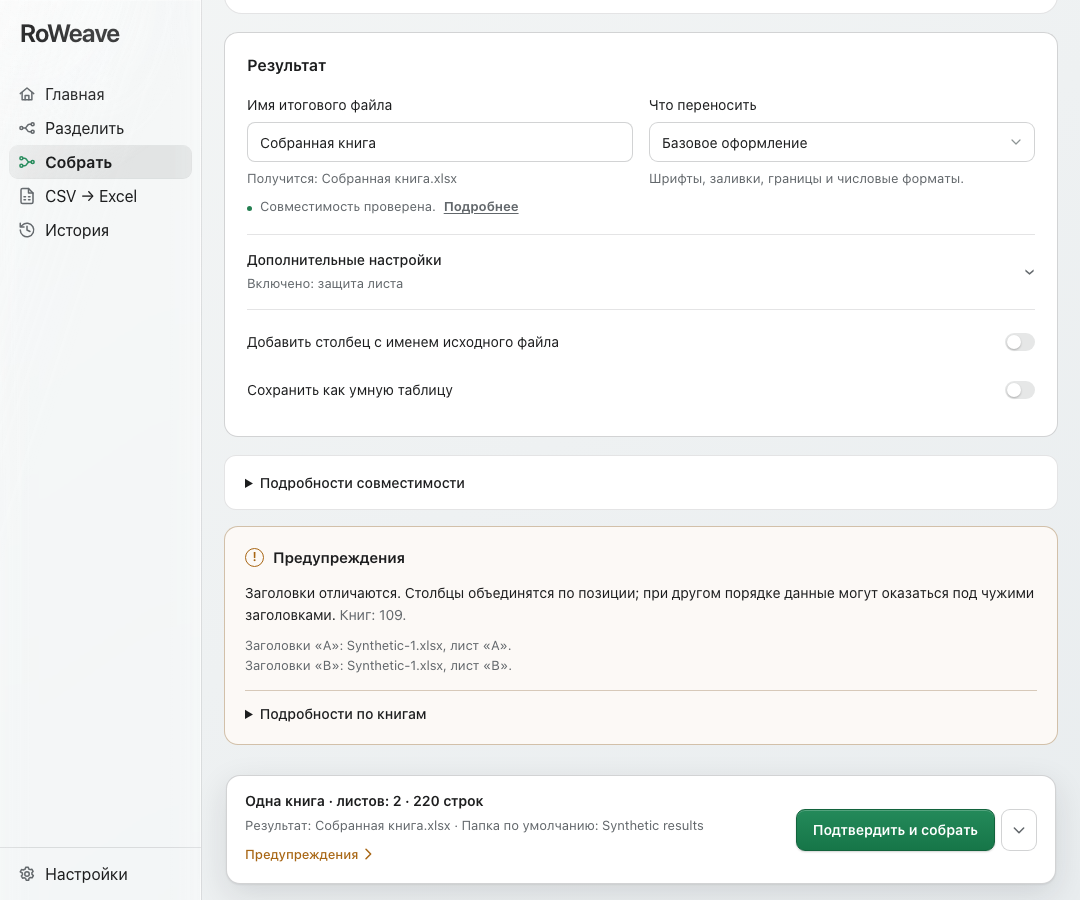
Before anything runs, RoWeave shows which files you’ll get and what won’t carry over.
Split
One sheet → a file for each value
Payroll→one file per department
More details
Choose a column such as “Department”. RoWeave creates one workbook per department, keeping the header rows, column widths, number formats, and fill and font colors. Pick several columns and the first one sets the subfolders. Each file can get its own password.
Combine
Many files → one sheet
30 branch reports→one sheet
More details
Drop in a folder of reports. RoWeave takes the right sheet from each workbook, checks that the headers match and stacks the rows into one table. Optionally add a column with the source file name. Password-protected XLSX, XLSM and XLSB workbooks work too; encrypted legacy XLS files (Excel 97–2003) can’t be opened.
CSV → Excel
CSV export → a proper Excel file
ERP or bank export→XLSX, zeros kept
More details
Product codes and IDs keep their leading zeros, and long numbers don’t turn into “1.2E+15”. RoWeave detects the file’s encoding on its own: UTF-8 and UTF-16, Windows-1252 and Windows-1250 for European languages, Windows-1254 for Turkish, Windows-1258 for Vietnamese, Windows-1251 and KOI8-R for Cyrillic, Japanese Shift_JIS, Chinese GBK/GB18030 and Korean CP949. When it isn’t sure, it shows a preview and asks. Large exports are read in chunks, up to 8 million cells.
How it works
1
Drop in your files
One workbook, a handful of files or a whole folder. XLSX, XLSM, XLS, XLSB, CSV, TSV and TXT are supported.
2
Check what you’ll get
Choose a sheet and a column. RoWeave lists the files it will create and warns you if anything won’t carry over.
3
Save the result
New files land in the folder you choose. Your original stays untouched, and past runs are kept in History.
Filter → copy → new file → paste → fix formatting. Repeat 40 times. One slip, and someone gets data that isn’t theirs.
A VBA macro
Works as long as its author is around. Often fails on a Mac, and many companies block macro-enabled files.
An online tool
You have to upload payroll or customer data to someone else’s server.
RoWeave
Pick a column, review the file list, click Split. Formatting intact, files stay with you.
What carries over to the new files,
and what doesn’t
Kept
Fonts, fills, borders, alignment
Column widths, number and date formats
Header rows above the table, in every file
Row heights
Beta, turn on in Advanced settings (off by default)
Sheet protection and editable cells
Dropdowns and data validation
Conditional formatting
In the “What to keep from the source workbook” section of Split and Combine.
Not carried over
Pivot tables, charts, images
Macros: the result is a plain XLSX
Formulas: you get the values Excel last saved
Opens XLSX, XLSM, XLS, XLSB, CSV, TSV and TXT. From legacy XLS (Excel 97–2003), Split carries over the data, number formats and merged cells, but not fonts, fills or borders; from binary XLSB, only the values. If any Combine source is XLS, XLSB or a text file (CSV, TSV, TXT), the whole table is written as values without formatting, including the parts from XLSX workbooks.
About
RoWeave is made by one developer. The app does three things: it splits a table, combines files and turns CSV into Excel. I add the rest gradually, based on feedback.
If something doesn’t work or something is missing, write tosupport@roweave.app.
Common questions
Where can I download it?+
At the bottom of the page, under “Download”: an installer for Windows and a DMG for Mac. RoWeave tells you when a new version is out.
How much does it cost?+
RoWeave is currently free for Windows and Mac: every feature, no limits, no sign-up and no ads.
Which computers does RoWeave run on?+
Windows 10 and 11 (64-bit, x64), and Macs with Apple Silicon (M1 or later) running macOS 12.3 or later.
Will my original file be changed?+
No. RoWeave only reads your source files and never writes over them. Results are saved separately, in a folder you choose.
Will formatting and formulas be kept?+
Split keeps fonts, fills, borders, column widths and number formats. Formulas are replaced with the values Excel last saved in the workbook: the numbers stay the same, but they won’t recalculate when the data changes. Combine also writes values, and keeps formatting when all sources are XLSX or XLSM workbooks.
RoWeave converts large CSV files to Excel in chunks, without loading the whole file into memory. The limit is 8 million cells (for example, 400,000 rows × 20 columns) and 4 million rows; with very long text in cells it can be lower. If there are more rows than an Excel sheet holds (1,048,576), RoWeave offers to spread them across several sheets. Split and Combine keep the whole table in memory, so their limit depends on your computer: for a large file, RoWeave warns you and offers to try anyway.
What about password-protected files?+
XLSX, XLSM and XLSB workbooks open fine: you enter the password in the app, and it is never stored. Encrypted files in the legacy XLS format (Excel 97–2003) can’t be opened. Split can also password-protect the new files: one password for all, or a different one for each, with the list saved to a separate file.
Do I need Excel installed?+
No. RoWeave reads and writes the files itself. You only need Excel, or any other spreadsheet app, to open the result.